
PART 1
Vendor directory and buyer finder.
Facebook groups are massive in our space, and most of what is useful in them sits in the posts nobody sorted. In this Part I hand the group to Claude and ask for contractors. You will not need the API from DataSift for this one.
What this gives you.
Use Claude to work your Facebook groups for you.
The vendor directory, finding more buyers, and using Facebook groups at the highest possible level for real estate. I found a ton of use cases by having my VAs manually go through and scrape. One of the newest things I stumbled onto is the Google Chrome extension inside of Claude.
You give it access to your Facebook group and it goes through and pulls what you ask for. Buyer information, or the best contractors for a particular task, based on what the whole group has said. People in there say yes, I am that thing, and that is the signal.
This used to be hard to hand to a VA, because you have to give them your Facebook login and all that stuff. Now you point Claude at the group instead.
You will not need the API from data ciph.
Ask for every trade at once.
Ask for the vendor directory skill on your group.
My prompt was plain. Use the vendor directory skill and find the top contractors for all of Knoxville, Tennessee that have been posting inside this group. Find every single trade and every nuanced person I would need to flip a house.
The hope here is to find as many as we can. Then I ask it to rank the top ones based on its own research after the fact. I copy that in and let it go.
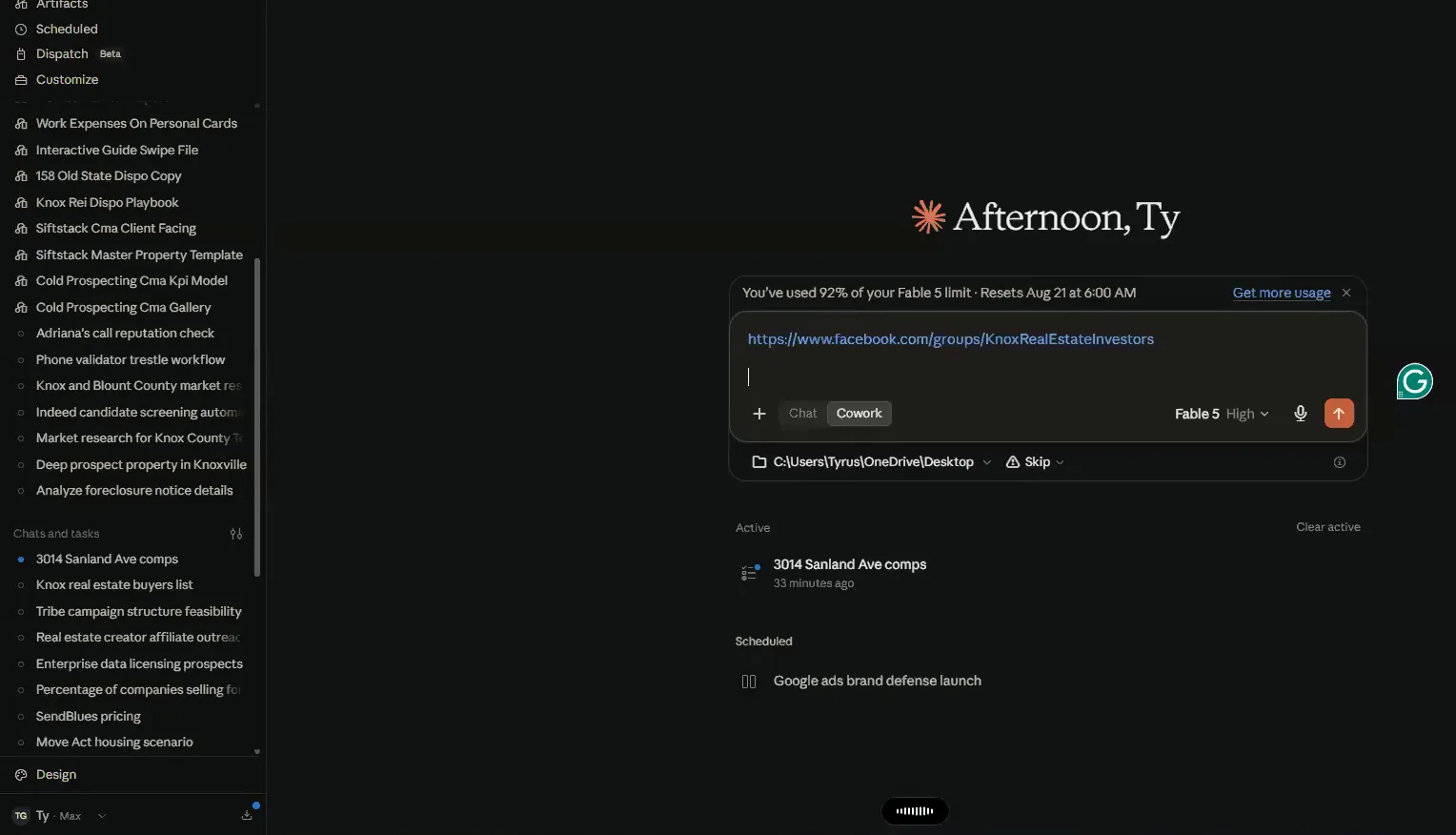
Let it scrape every vendor inside the group.
I did not run this one live, because I had already pulled it once and saved it to the drive. I think I called it a contractor list, something like that. Getting all of these files managed is one of the hardest parts of all this.
This is what the output actually looked like. Here is every general contractor, and the highlighted rows are the ones people in the group recommend.
So it will go through and scrape every vendor inside of that real estate group, and this is what that output actually looked like.
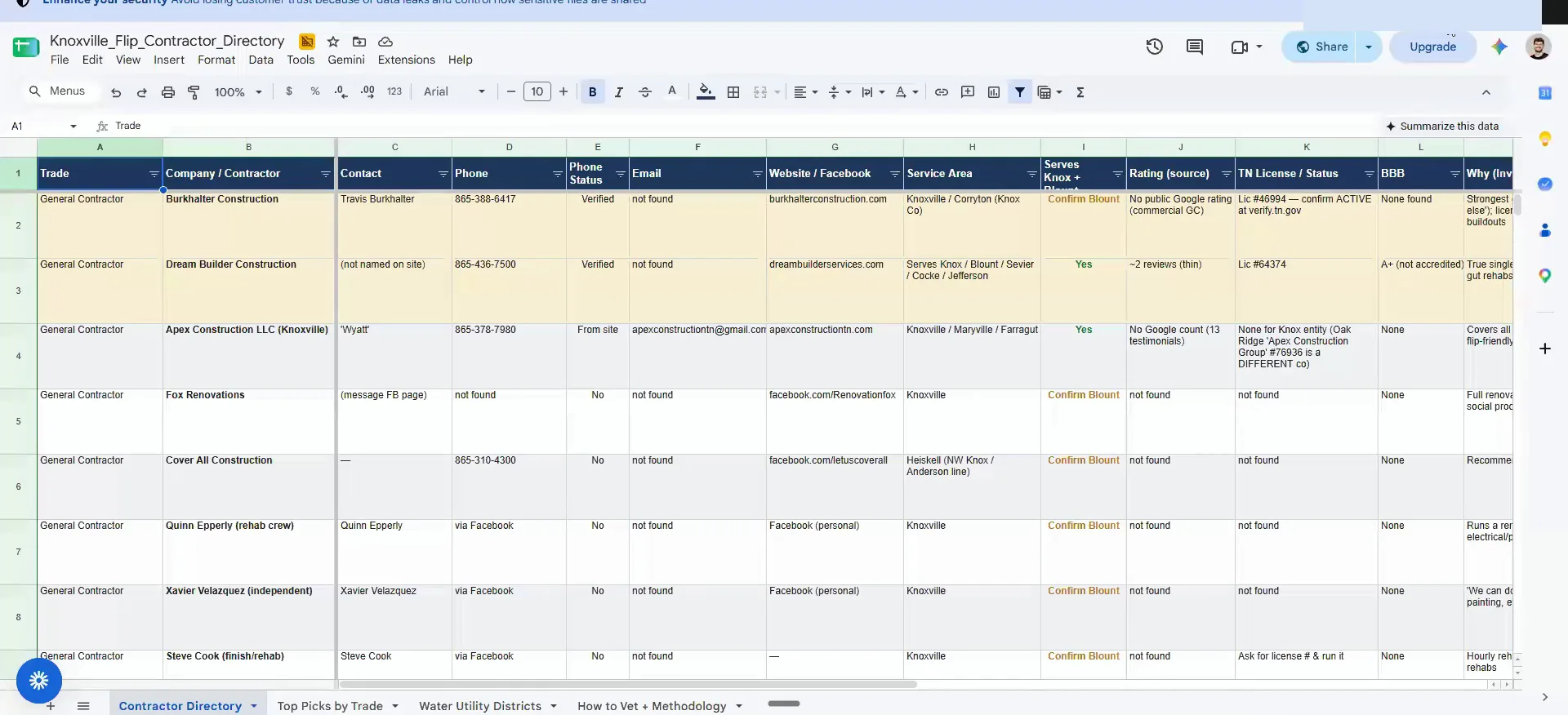
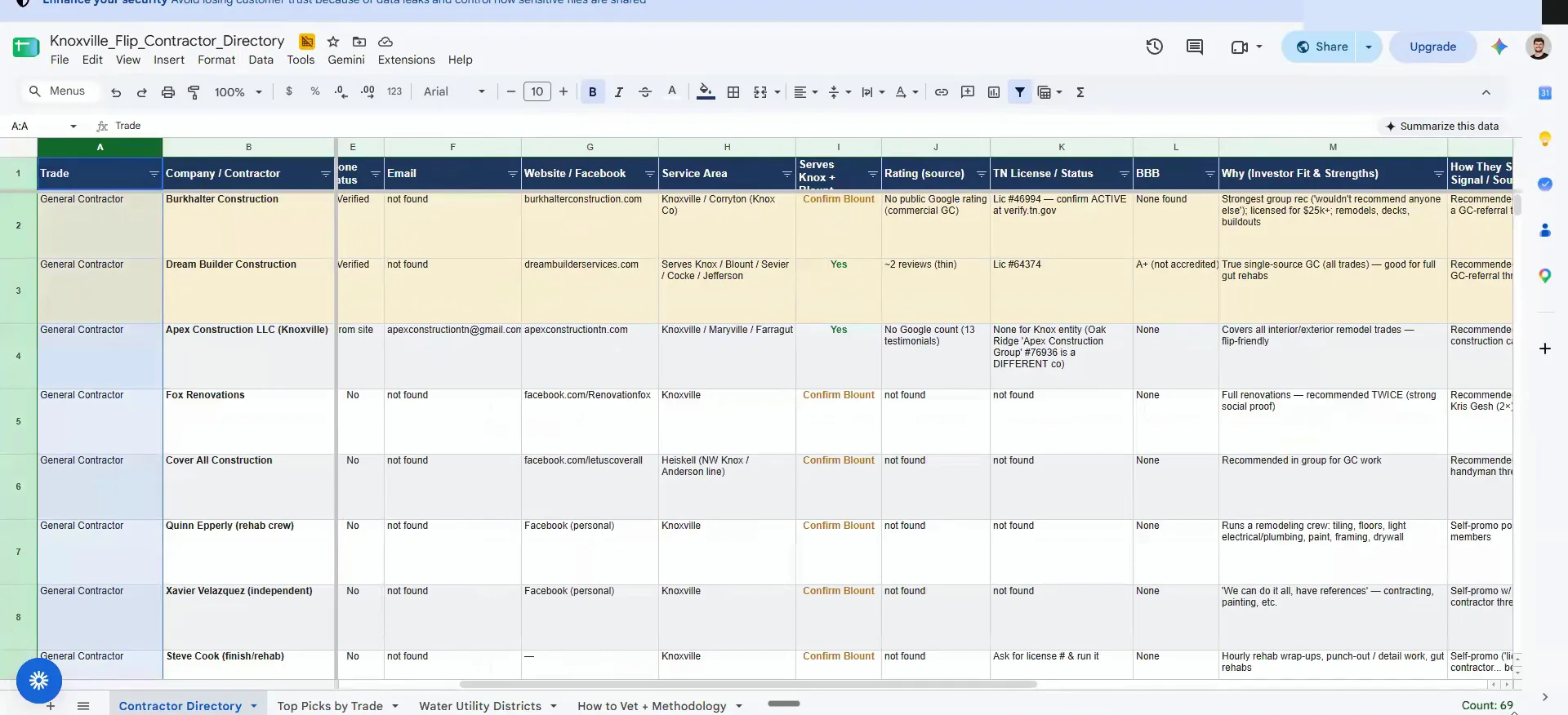
Read the columns before you pick anyone.
It breaks down the contact, the phone number, was it verified, was there an email, do they have a website or a Facebook account. Then the service area attached to them, any public source rating, are they on the BBB, is there a license. Then what investors said about them in the group, and how they surfaced in it.
It also gives you cautions to consider, a confidence score of high, low or medium, and whether it is a top pick. Inside of this it pulled 68 different contractors. GCs to handyman, plumbing, electrical, HVAC, roofing, foundation, flooring, painting, drywall, everything.
We use this to get quotes on everything. You can save a ton of money by subbing out the specialized work instead of having one GC manage all of it.
This is an enormous hack that will save a shitload of money because the one of the biggest pitfalls of all this is picking the right person.
Picking the right person
Sub out the specialized work instead of having one GC manage everything. One of the biggest pitfalls is picking the right person, and people are biased toward the first person they talk to.
BEFORE YOU MOVE ON
PART 2
Vendor quotes, buyers and a scheduled scrape.
The same skill that pulls contractors out of a Facebook group also pulls buyers out of one. It runs inside Claude CoWork, through the Chrome extension, on your own computer. Then you can put it on a schedule so it checks the groups while you are not looking.
One skill, vendors and buyers.
Query Facebook groups through Claude CoWork.
This is unbiased and automated. You go get a property, take two or three weeks extra, and get quotes from every single one of these people. You see how fast they get back to you, and you see if they blow you off.
I tell you to use Claude CoWork because it does a really good job of going through the Facebook pages without triggering automation issues. It is literally using your exact IP, your exact domain, and your exact computer.
Because it's using your exact IP address, your exact domain, and everything, so it's much more stable because it thinks it's literally you doing it.

Ask the same skill to find buyers.
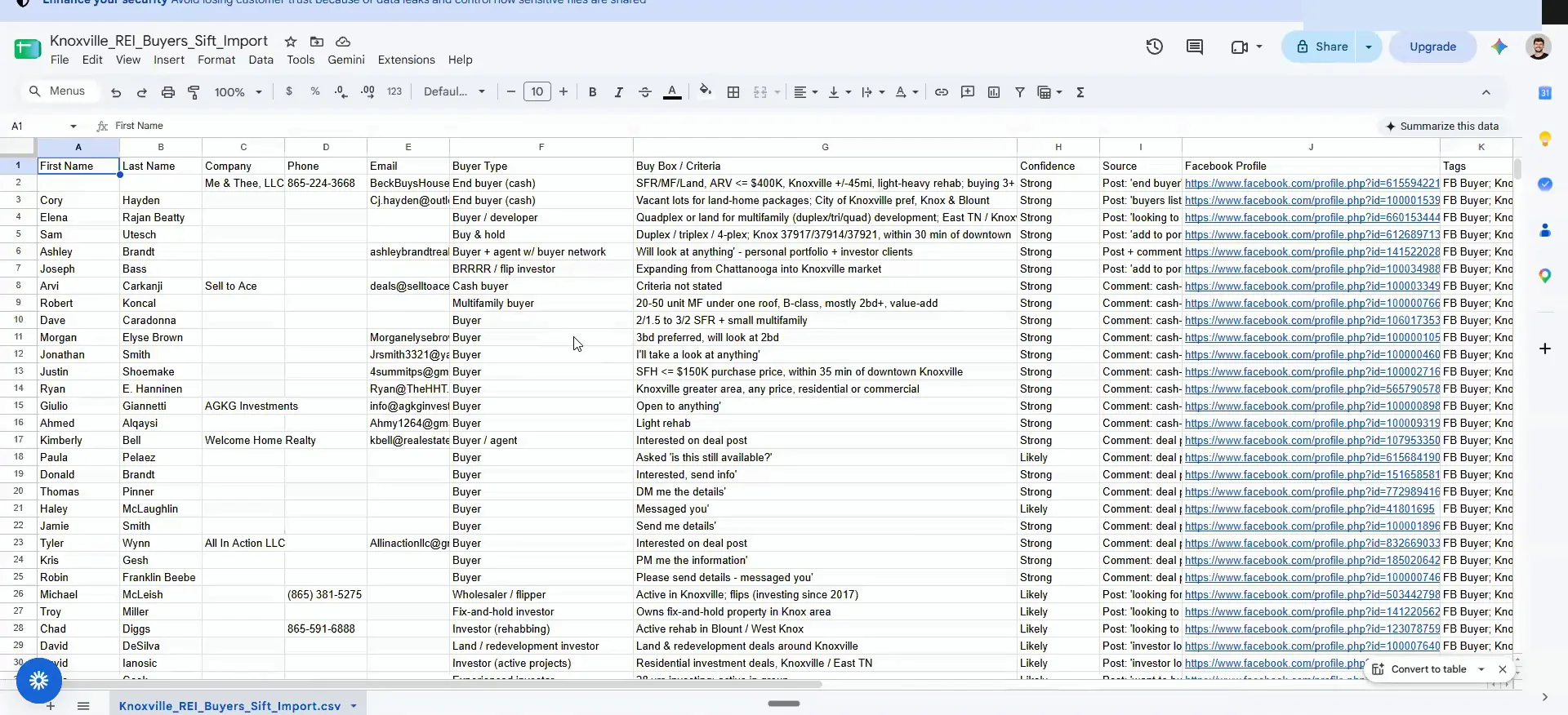
The second layer is the same infrastructure wired in for buyers. You can point it at contractors and vendors. Or you can ask it to find everyone who put their buyer contact information inside a group.
It will even give you the exact URL of the profile of the individual that made that post. The vendor directory skill and the buyer finder skill are both the same thing. It is the ability to query Facebook groups inside Claude CoWork.
And that skill is called the vendor directory skill that I pasted inside the chat, and it will it's already prebuilt into the SIP stack agent structure.
Two skills
Both skills query the same Facebook group.
Vendor directory skill
- What it findsContractors and vendors in the group
- Where you run itClaude CoWork
- Likelihood of Meta banning your accountNear zero
Buyer finder skill
- What it findsPeople who posted buyer contact info
- Where you run itClaude CoWork
- Likelihood of Meta banning your accountNear zero
The $20 plan should be fine.
Run this on the $20 plan, and skip Opus.
Coral asked if you need the higher plan to run the Facebook piece. You should be able to slide past it. You should be fine on the $20 plan.
One caveat. Do not use Opus for this one. Opus is designed primarily for cybersecurity things, and it does not like it whenever you are trying to scrape stuff. It triggers security warnings.
Use the same workflow on private money lender groups.
Michael asked about sources other than the Facebook investor group. I have yet to test that one myself, but I know this works, and it is my prerequisite there.
Greg asked if you can also use Claude to post in these groups. Yeah, you could. Post your deals in that one. There are a thousand things you can do with stuff like that.
So I'll be showing you guys how to prospect private money lenders, and you can use that same workflow to scrape lenders.

A scheduled task every three hours.
Ask it to build a scheduled task on the group.
Here is what I would say. Build out a scheduled task that reviews properties being posted inside this Facebook group, at a cadence of a three hour basis. Keep it to standard times that someone will be awake, so from 9AM to 9PM.
The hope is there are deals I am probably missing out on, because I am not often checking Facebook. Set up the scheduled task using the Chrome extension. There is a little function over there that says scheduled, and that is exactly what that is for.
Once you have proven this process from a stability and quality perspective, I want you to also create skills that improve the stability of this.
Give it Chrome, and nothing else.
Nara asked if she has to hand over her Facebook account. It logs directly into Google Chrome. So you would have to have Chrome, and anything it has access to inside Chrome, it will also have access to. It will not need anything else.
Kashif asked if Claude will tell him what he can and cannot do. Oh, it will let you know. It will be a pain in the ass. It will just say it cannot do it.
This is why the Chrome extension has a little more leniency. Everything it is doing, you could do manually. It would just take four hours probably to do it.
BEFORE YOU MOVE ON