
PART 1
From research to outreach.
This part is the campaign export, the heir personalization, and the SmartSkip process. I want you to see what one record looks like before any of the work happens, and what it looks like after. Then you can make calls off it.
What SmartSkip does.
Reach the people on file for a property, not just the owner.
SmartSkip is by far and wide one of the best tools for skip tracing out there. It finds the heirs or the people associated with a property. That gives Claude a starting point for the new prospecting workflow.
It also gives you the mailing addresses on file for all of those people, and the phone numbers. So you can send mail to them, and you can call them and have a more personalized touch.
So an example would be, say, there are 10 people on file knowing exactly where they all live, phone numbers associated with them.
The campaign export and the shortlist.
Export the owners you want to deep prospect from the records page.
Sign in, come over to records, and download the campaign format. That is the file we are working from. Inside Sift I am using the API to do this, but you can download the whole list yourself.
Yueh asked how long a list of 60 properties takes to run through. Maybe thirty minutes.
Campaign export
SmartSkip whittles 41 numbers down to the people that matter.
- 1Export from the records pageYou take the whole list you want to deep prospect and export it through the records page.
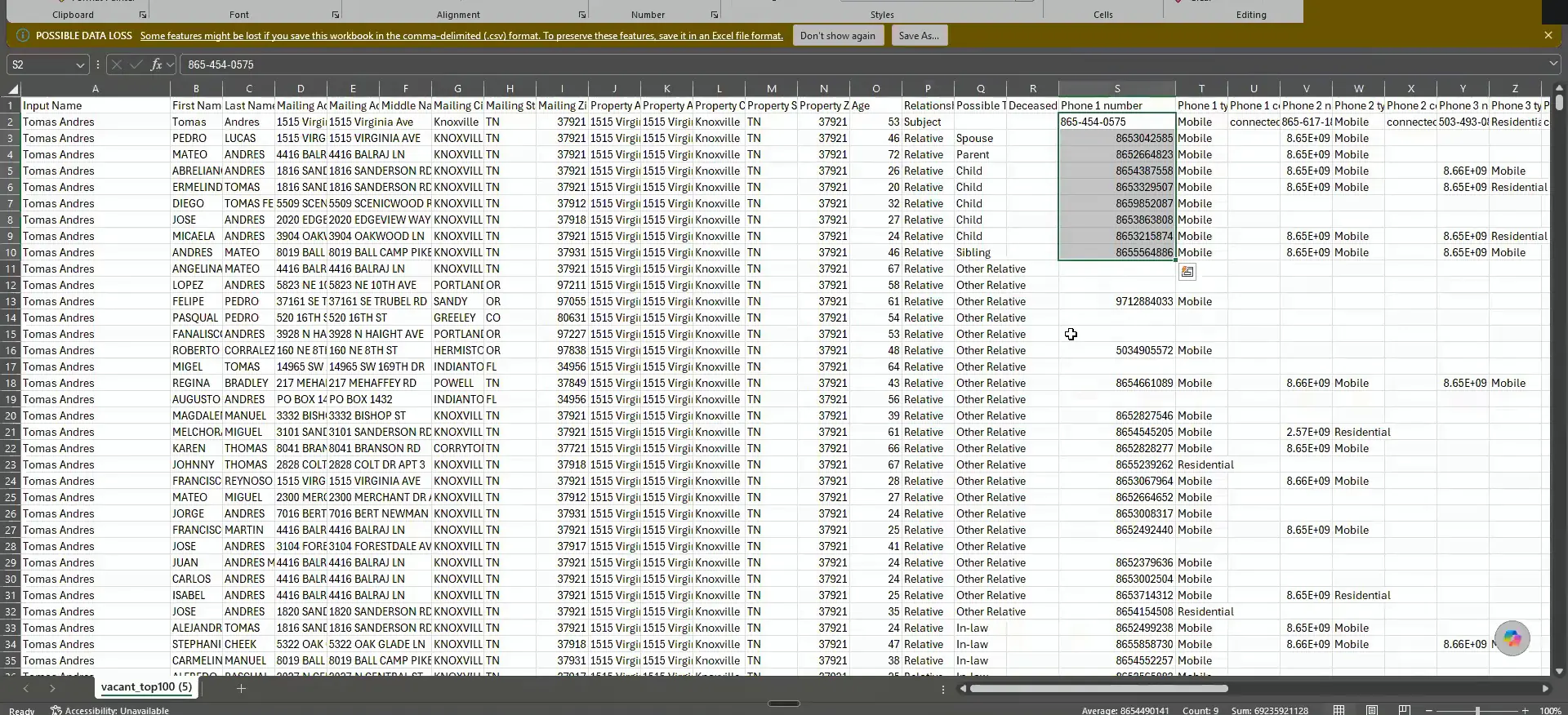
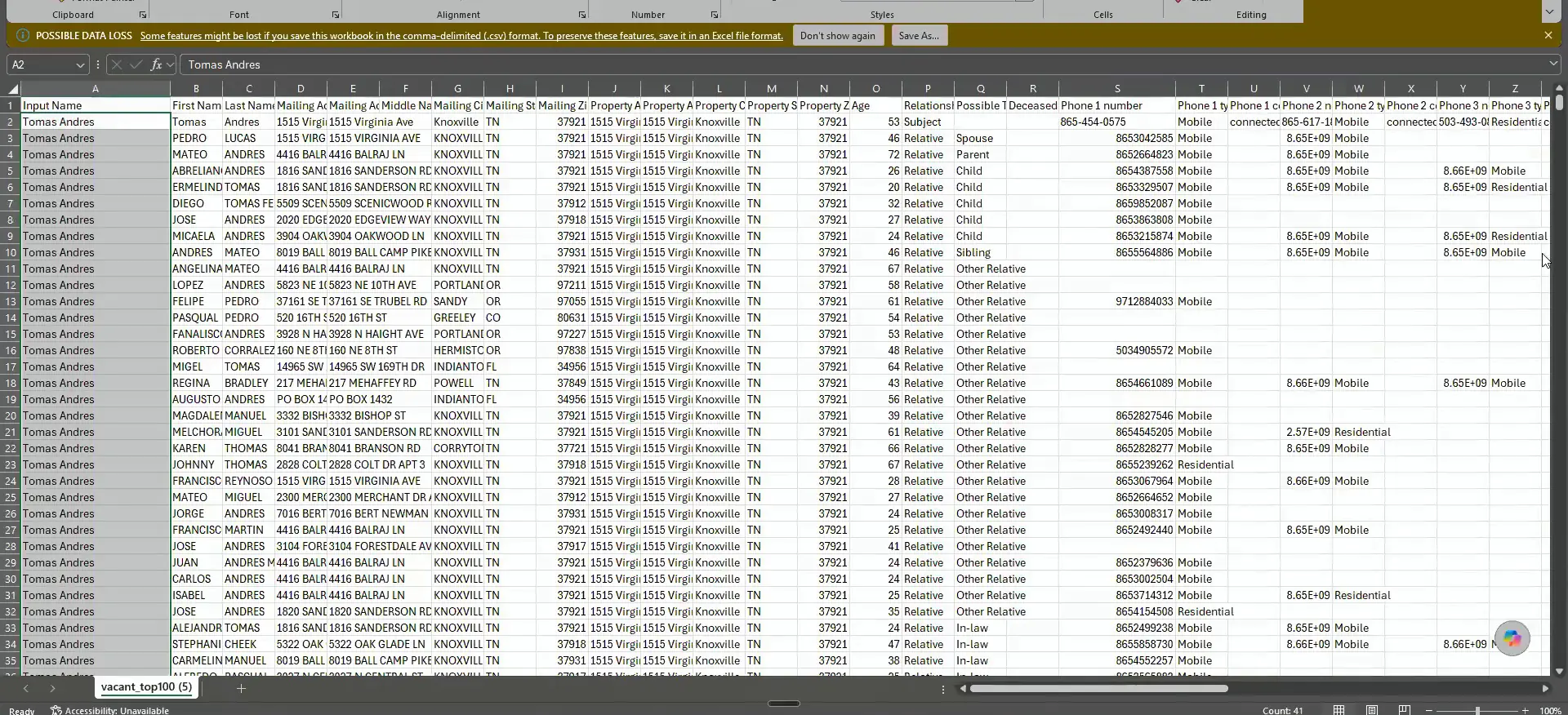
- 2Look at all the numbersOne random record came back with 41 people on it, the neighbor, the in law, all of them.
- 3Read the data and the storyIt reads all of that data and builds the narrative and the story going on with this individual.
- 4Shortlist and skip traceIt whittles the 41 down to the actual people that matter, then skip traces them.
- 5Tag through TrestleThe tagging happens automatically through Trestle once the shortlist is done.
- 6Pin the full summaryIt pins the message with the full summary so you can do all the calling right there.
Look at every number that comes back on one record.
Look at this one random person. There are 41. We have the neighbor, the in law, all of these random people associated with Tomas.
It reads all of that data and builds the story that is going on with this individual, the same way I showed you in Claude. Then it whittles that 41 down to the actual people that matter. It shortlists them, skip traces them, and automatically tags them through Trestle. It is so good.
This used to take a team of three VAs. Two to five records a day would be a good day, I would say.
But if you look at this, look at all the numbers that come back for just this random person.
Open the pinned message and start calling from it.
Click into the record and you get the full summary of everything, exactly what it looked like when I showed you in Claude. It pins that message, and you can just go in and do all the calling here.
Here is a person who passed away. Here is the actual obituary filing for him. Everything you need to say on the call is sitting in that summary.
BEFORE YOU MOVE ON
PART 2
From the record to the outreach.
Everything the research turned up now sits on one record, ready to work. The heirs get called in order, and they get a letter at their own mailing address. Here is how that part runs.
All the details of the owners.
Read the message board before anyone calls out.
Here you have all the details of the owners that are on record. The numbers you see are all of the heirs associated with that person. Then you can read the message board and understand everything that was going on before they do the outreach.
This is why I think having a person dedicated to all this helps. They understand what is going on with this individual record, and they just have to get in contact with them. That is why it is so powerful.
Here's all the details of the owners that are on record, And it will then do the entire trestle flow on everything that I just outlined.
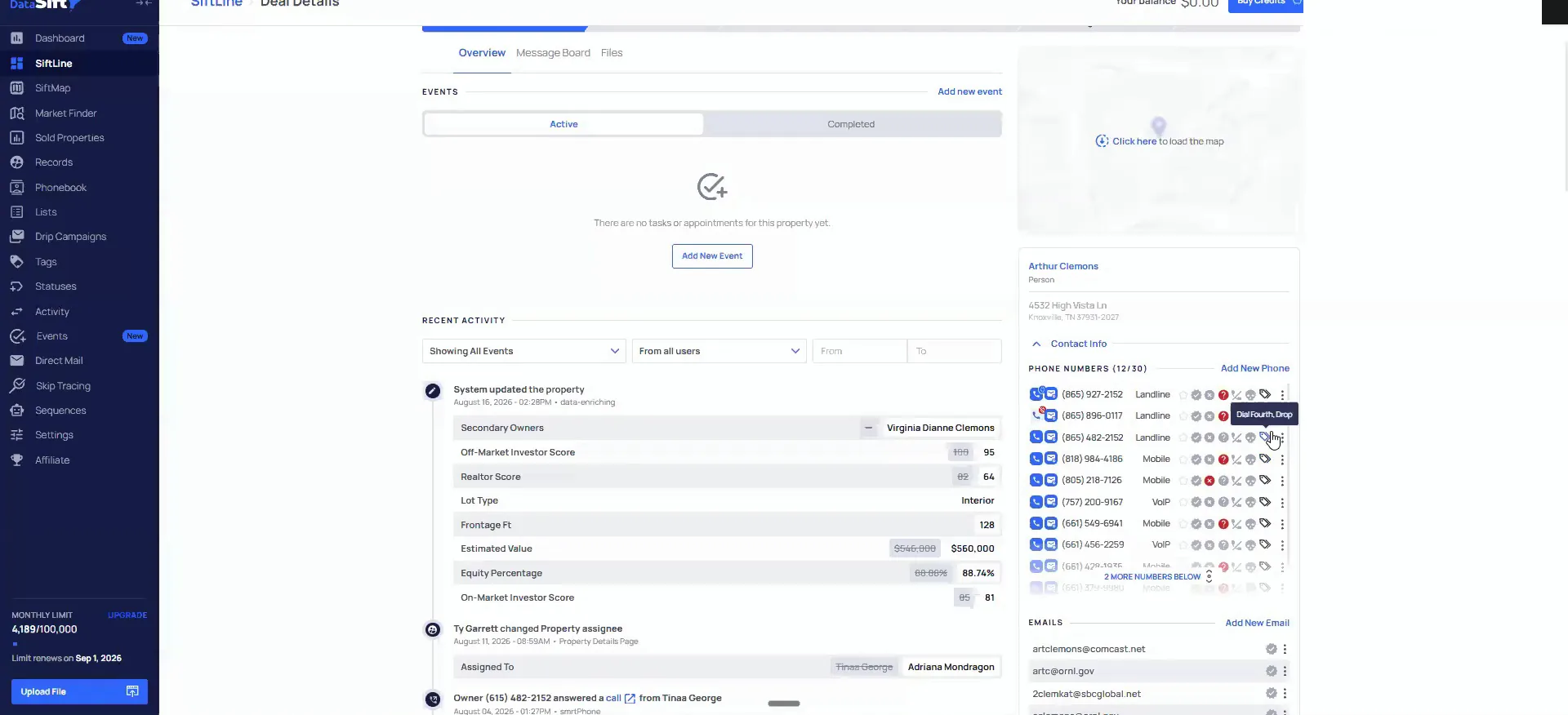
Say the heir's name, not the deceased owner's.
That saves automatically to DataSift. Then you go in there and you run the sequence of call, voice mail, email, and all that stuff.
The reason I put so much emphasis on this is that the personalization does very well. That small change of understanding the heirs you are reaching out to does much better than saying the deceased person's name instead.
The unlock from SmartSkip is the raw output. The 41 individuals I just showed you are all from one hit, and that was 15¢ to get all the phone numbers.
So this was 15¢ to get all the phone numbers associated with all these people.
Upload the mail list straight to Open Letter.
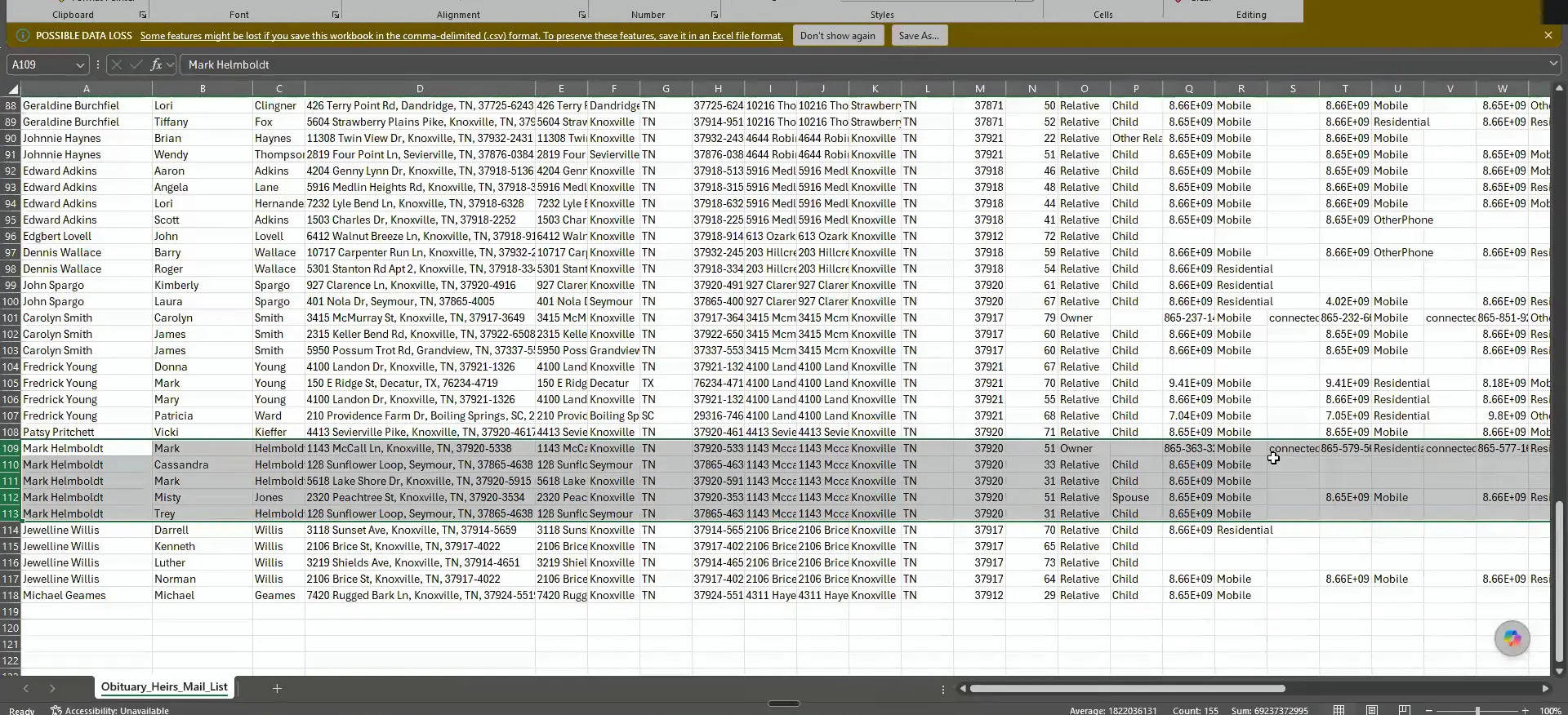
The system does not currently support mailing that many people from the same record. So I take the file and upload it straight to Open Letter instead.
From there I say I want to mail these individuals directly. Here is the list, and each person gets their own letter at their own mailing address.
It's about $1.75 a mailer.
Mail the heirs and call them at the same time.
It is about $1.75 a mailer, which is a little bit more costly. But when it is handwritten like that, I think the odds they are getting mail are very low. I am essentially guaranteeing they see the letter.
I really just need one of the heirs to respond to get the foot in the door. All marketing goes out at the same time ideally. Whether that is email, mail, or a call, the sooner you can introduce it, the better it will perform.
I am doing this process for the deep prospecting people only, because there is so much involved with it. Obituary records is all I am focusing on, plus the dream 100 list from the rest of the records.
This is also why the deep prospecting stuff we're trying to build, know that these 250 people are really good opportunities.
Let the automation shortlist to dial first and second.
When you have this many numbers on one contact, you go over the 30 range fast. That was the question I got asked, and this is the answer.
The automation takes all these phone numbers and only adds in the ones that are a dial first or a dial second. It cleans all of the others before the file is uploaded. That is how I got around it.
All marketing
All marketing goes out at the same time ideally, whether that's email, mail, or call. The soonest you can introduce it, the better it'll perform.
BEFORE YOU MOVE ON
PART 3
Mail the heirs, then reach them.
This is the last part of the flow, where the research turns into mail and phone numbers. You mail the personal representative if there is one, and the family if there is not. Then you use the skill and the skip tracing to actually get the decision maker on the phone.
We're mailing to the PR.
Mail the PR when you have one on file.
We use OpenLetter, but we're mailing to the PR. If we have a PR on file, then we're just mailing the PR. If there's no PR, we're just mailing the family.
The one you are doing, you're sending all the heirs. So for one record you might be sending several pieces of mail. I have been speed reading this list and I haven't seen one that's even over six.
And I wanna guarantee that they're going to open it because handwritten mail is gonna have a very high open rate regardless.
Suppress the normal stuff, then run buy box plus obituary.
This goes through all the obituary that you have. Any of the records, it doesn't matter what it is. I still suppress the normal stuff first.
So buy box plus obituary, we do this. The odds that these people are getting marketing is virtually zero, which is why I am willing to put the energy in.
So, if it's been recently sold, if it's got low equity, all that stuff that I normally do, I suppress all that.
Get on the AI plan if you want the scores.
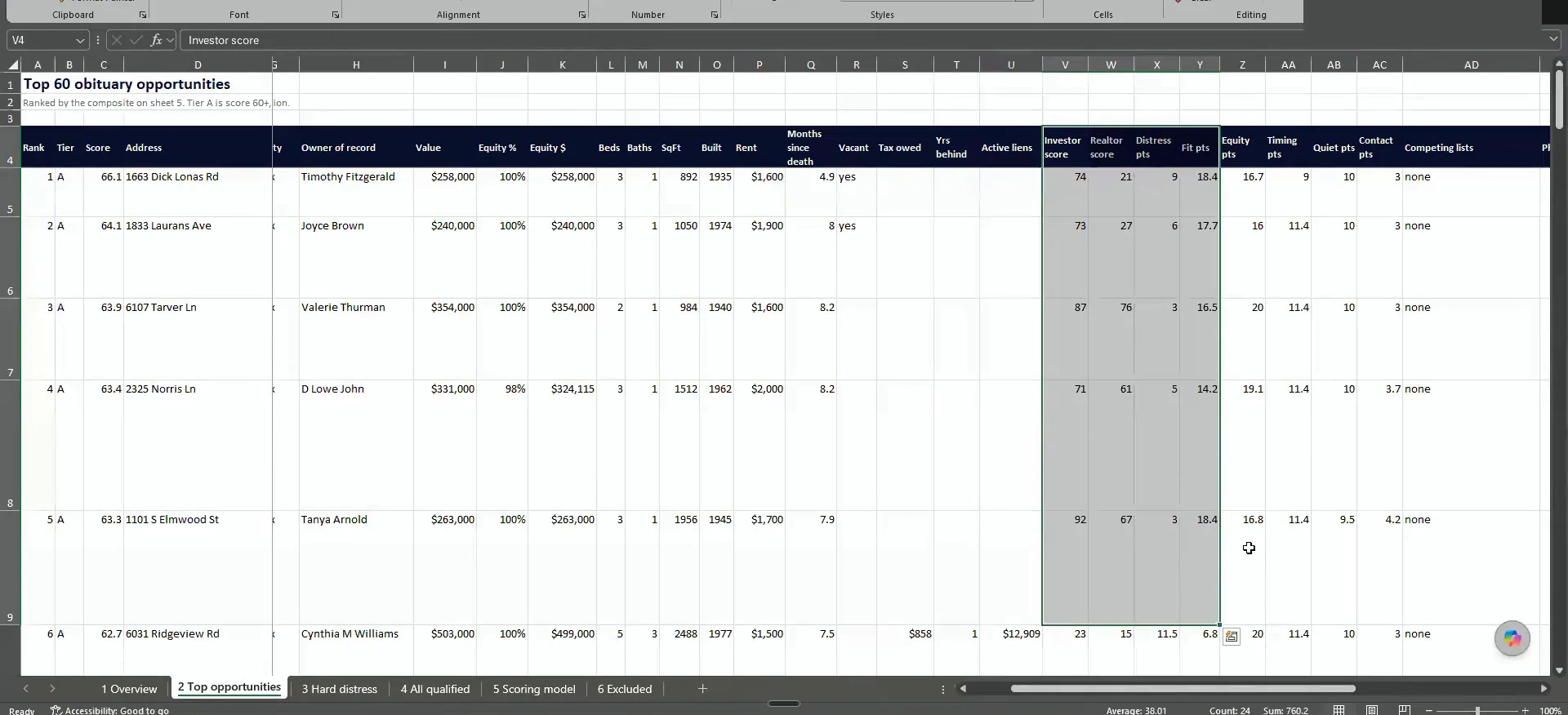
Somebody asked if the AI scores narrow this list down. They do. When I was showing the opportunity list, it's also factoring in all the AI models too.
For this, you need to be on the AI plan. I don't talk about it too much, but it is part of how that list gets ordered.
You take the records outside.
Export the record when you need to mail several people.
Right now you pull the record out and work it outside the system. Exporting it is a pain, which is exactly why we want a feature that does it for you.
Sometime around the end of this year, I think we'll have all of these potential decision maker owners inside of a record. Then you can mail multiple people straight from there.
But the Sift is so good because we do all of this and we're like, this is a huge pain in the ass to have to export this.
Let the deep prospecting flow verify the heirs for you.
Somebody asked if you verify ownership of the heirs before sending mail. The deep prospecting flow is doing that. That whole deed chain, that whole research flow.
If I crack open the raw export that comes from SmartSkip, all of those people associated with the owner get whittled down. You end up with the few people we need to actually reach out to. That's what that output looks like.
That's I mean, part of it was kinda fun for me doing that stuff just to a small degree, kind of the sleuthing.
Claude will go in a loop.
Ask Claude to search again when you still can't reach someone.
If you still can't reach the person you want after this, that is where the manual workflows come in. You can tell Claude you still can't find these people. It goes into a recursive search, so it loops until it figures it out.
I don't do that in the beginning because it uses a lot of credits. I don't think you need to, honestly. I have seen one case with a mystery heir where it was worth doing. It is really good at finding people who are very hard to reach.
Expect the skill to change with each cohort.
Somebody asked if I tinker with the skills through each cohort. I do. The deep prospecting skill you have now is a later version than the one the first cohort got.
It also updates with our product. When something big changes, I go update all the skills so they know what the new setup is.
API is obviously a big infrastructure update that I'd update all the skills to be like, this is what the API is.
Re-skip the heirs individually if the numbers are busted.
Nick asked what he does when the heir numbers turn out to be bad. This is an important question and I don't think I covered it well.
Take this David Graham person. David Graham is the decedent, and Joseph, Michael, Natalie and Tammy are the children and the spouse. When you go to market to this person, it will skip trace all of them using the newly found mailing addresses in direct skip.
If you want, you can have SmartSkip individually skip trace these people as well. That will add more phone numbers that SmartSkip did not have the first time.
So whenever you go to do marketing to this person, it will skip trace all of these people using the newly found mailing addresses in direct skip.
BEFORE YOU MOVE ON